We all see emerging Agentic Infra as replacement of IaC (Infrastruture as Code) — 4 principles here are universal, I select observablity as area where we work with very large, comples, interconected, timed data structures, ideal use to demonstrate pros and cons of diferent aproaches + plus every AI project need observability so may you will learn something usefull by the way too.
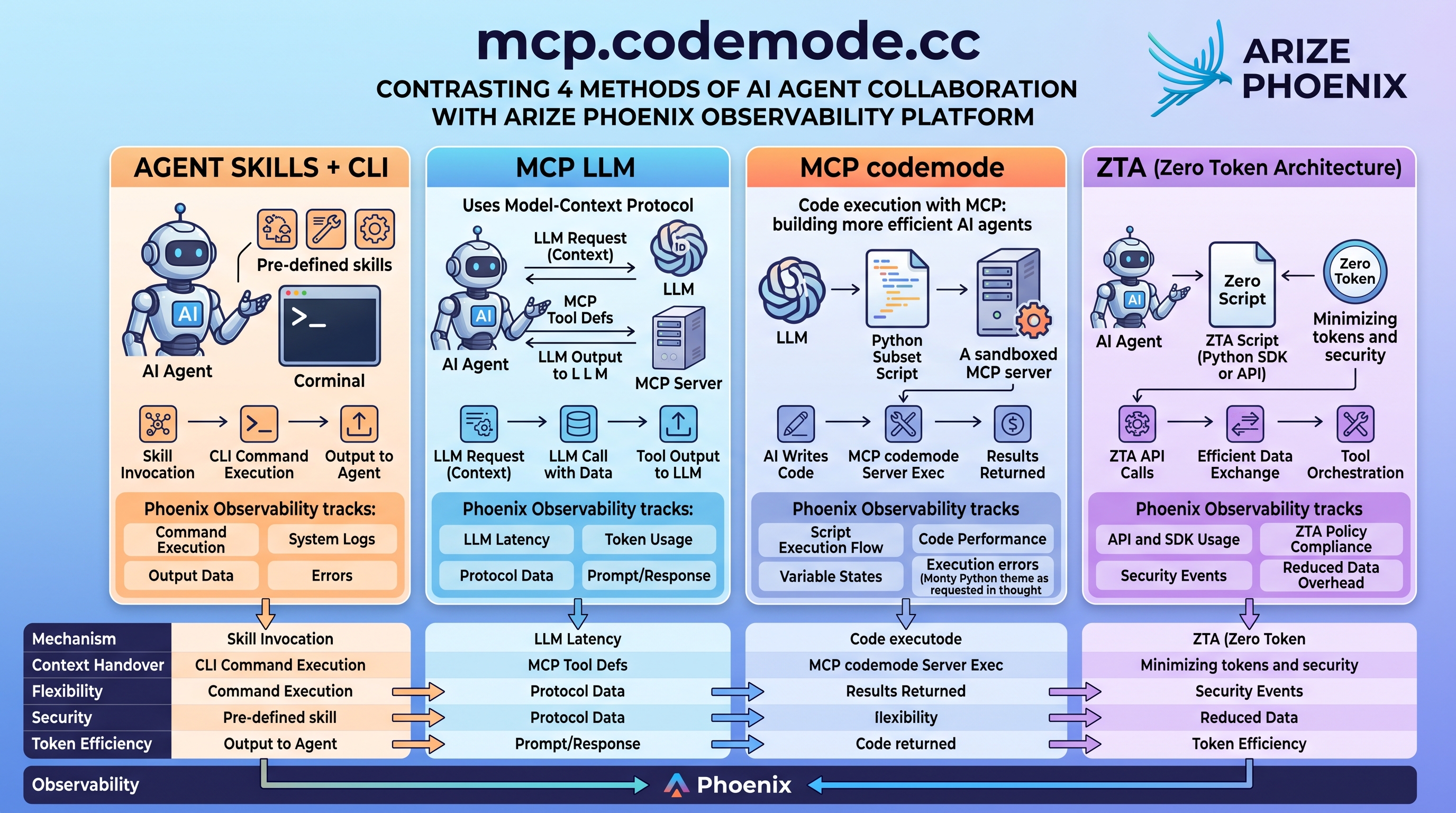
HEAD 2 HEAD — 4 principles
Blueprint detailing how an AI agent harness connects to the Arize Phoenix observability platform. It maps the end-to-end execution flow, telemetry tracking spans, and architectural characteristics across four AI Harness patterns:
Agent Skills + CLI
Invocation of pre-defined agent skills through a terminal interface and shell binaries.
Pros
- Rapid Prototyping: Directly leverages standard OS binaries, custom CLI scripts, and existing terminal tools without custom protocol wrappers.
- Standardized System Telemetry: Phoenix natively captures process exit codes, stdout/stderr streams, and low-level system logs.
Cons
- Brittle Parsing: Reliant on parsing unstructured text output, which frequently breaks downstream reasoning loops.
- Expanded Attack Surface: Unrestricted command-line access carries significant command injection and sandbox-escape risks.
MCP LLM
Standard Model Context Protocol exposing JSON-RPC tool definitions into the LLM context window.
Pros
- Native Semantic Awareness: Tools are embedded directly into model context, allowing fluid multi-turn planning and dynamic schema discovery.
- Fine-Grained Prompt Observability: Phoenix tracks complete prompt/response cycles, token usage, tool invocation latency, and protocol metadata.
Cons
- Heavy Context Overhead: Loading extensive MCP tool schemas directly into prompts rapidly exhausts available context space.
- Compounding Costs: High latency and token consumption across multi-step agent reasoning chains.
MCP codemode
Sandboxed Python execution on an MCP server returning processed prompt, code, and response data.
Pros
- Token Efficiency: Processes and filters large datasets in-memory on the server, returning only curated summary data to the agent rather than raw context.
- Granular Traceability: Phoenix records execution flow, variable states, code performance benchmarks, and runtime exceptions.
Cons
- Runtime Sandboxing Complexity: Requires strict isolation boundaries (such as a restricted Python subset) to prevent unauthorized execution.
- Dynamic Debugging Friction: Code execution failures require robust runtime recovery paths to prevent the harness from stalling.
ZTA – Zero Token Architecture
Deterministic orchestration using a Python SDK or direct API calls, reporting final status back to the agent.
Pros
- Maximum Cost & Speed Efficiency: Payload movement occurs entirely outside the LLM context, virtually eliminating token overhead and latency bottlenecks.
- Deterministic Policy Governance: Strict API schemas provide tight compliance, predictable auditing, and deterministic security controls.
Cons
- Zero Adaptive Reasoning: Inflexible handling of novel edge cases; changes require programmatic code updates rather than dynamic agent adaptation.
- Higher Engineering Burden: Demands custom SDK and API pipeline maintenance rather than generic declarative agent prompts.
Part of EDU AI LAB — “Local AI is not CHEAP!”
Hey!!! Local AI is not CHEAP at ALL! — every AI token carries a cost. Metering and billing internal teams by the token is essential: it creates accountability against wasteful compute loops and directly amortizes the infrastructure, pipeline, and staffing investments. This lab contrasts & compares agentic-infra approaches on that shared stack.
Related project
- inside.cottonbox.cc — tame evil in sandbox: slim, near-invisible sandboxing that keeps AI agent swarms (MCP, tool-use, coding harnesses) from ruining your day.
Inspirations
Code Mode design ‘deep dive’
Code Mode in Production Harnesses — Pi 1.0, OpenCode 2.0 & Across the Ecosystem
Both Pi 1.0 and OpenCode 2.0 now ship native Code Mode out of the box, alongside OpenAI Codex CLI, Goose, and Claude. Instead of dumping every MCP schema into the prompt and streaming raw intermediate tool payloads through the LLM context window, the agent writes a small program that orchestrates tool calls in parallel, filters data in-memory, and returns only the distilled result.
| Harness | Native Code Mode? | Sandbox Runtime & Language | Tool Discovery & Catalog |
|---|---|---|---|
| Pi 1.0 | Yes (codemode tool) |
QuickJS (JS, 256 MB cap) | exposure: "codemode", searchTools() (BM25), describeTool(), ALL_TOOLS |
| OpenCode 2.0 | Yes (execute tool) |
Confined JS Runtime + fetch |
codemode: true (default for MCP), tools.<ns>.<tool>, search() |
| OpenAI Codex CLI | Yes (functions.exec) |
codex-code-mode-host (JS, local or remote WS) |
code_mode_host = true (default), Promise.allSettled() batching |
| Goose (AAIF) | Yes (code_execution) |
pctx / Deno (TypeScript) | 3 meta-tools: list_functions, get_function_details, execute_typescript |
| Claude Code CLI / API | Hybrid (MCPSearch + PTC) |
Tool Search in CLI; Python container in API PTC | defer_loading: true (ENABLE_TOOL_SEARCH=auto:5) + code_execution_20260120 |
Tau (huggingface/tau) |
Via Extension | Python 3.12+ (tau.register_tool) |
Minimal 4-tool core (read/write/edit/bash); embed Monty via extension |
codemode tool (QuickJS Sandbox)
Harness-side QuickJS VM (256 MB cap, top-level await, no filesystem/network/timers) that exposes MCP & built-in tools as JS functions.
How it is enabled & configured
- Auto-enabled for MCP: Connects automatically when any MCP server in
~/.pi/agent/mcp.jsonor.pi/mcp.jsonuses the default"exposure": "codemode", or always-on via"defaultTools": ["+codemode"]insettings.json. - Exposure control: Per-server
exposureand per-tooltoolExposurelet you route tools ascodemode(script-only, ~40% fewer prompt tokens),deferred(loaded via search),direct, orhidden.
How it is used
- Tool orchestration: Scripts call
await tools.mcp__<server>__<tool>(args)or built-ins liketools.read()/tools.bash(), discovering unlisted schemas on demand withsearchTools()(BM25),describeTool(), andALL_TOOLS. - State & auxiliary models: Persist small JSON state across turns via
store(k, v)/load(k), emit curated output viareturn,text(), orimage(), and invoke non-LLM models withmodels.classify()andmodels.generateImages().
// @options: {"max_output_tokens": 2000, "timeout_ms": 60000}
const hits = await searchTools("phoenix spans");
const [proj, spans] = await Promise.all([
  tools.mcp__phoenix__list_projects({}),
  tools.mcp__phoenix__get_spans({ project: "default", limit: 200 }),
]);
const slow = spans.filter(s => s.latency_ms > 1500);
store("slow_span_ids", slow.map(s => s.id));
return { projects: proj.length, slowCount: slow.length };execute tool (Confined Code Mode Runtime)
Confined JS runtime for scripting catalog tools and fetch requests while enforcing per-tool permissions on every nested call.
How it is enabled & configured
- Default for MCP servers: Every server under
mcp.serversinopencode.jsoncdefaults to"codemode": true(set"codemode": falseto keep a server on the provider's native tool list). - Granular permissions: Permission
execute(*) gates Code Mode itself, while every nested call inside the script still enforces its own permission rule (e.g.<server>_<tool>).
How it is used
- Namespaced catalog & search: The agent calls
execute({ code })to run JS against tools in the catalog (or discovered viasearch()) usingtools.<server>.<tool>(input)(ortools.<ns>["tool-name"](input)) plus nativefetch. - Built-in namespaces & concurrency: Beyond MCP servers, scripts orchestrate
tools.opencode.*(sessions, worktrees, model lookup, MCP resources) andtools.browser.*(desktop browser automation), running independent calls concurrently withPromise.allSettled().
const [resA, resB] = await Promise.allSettled([
  tools.phoenix.list_projects({}),
  tools.opencode.list_mcp_resources({ server: "phoenix" }),
]);
const projects = resA.status === "fulfilled" ? resA.value : [];
return {
  activeProjects: projects.map(p => p.name),
  resources: resB.status === "fulfilled" ? resB.value.resources.length : 0,
};functions.exec (codex-code-mode-host)
Dedicated local or remote WebSocket execution host enabled by default in Codex CLI (v0.146+).
- Configured via
~/.codex/config.toml: Enabled by default under[features]withcode_mode = true,code_mode_host = true, and optionalcode_mode_only = true(or remotely via--code-mode-host wss://...). - How it is used: The agent writes JS in
functions.execto batch nested built-in tools (exec_command,apply_patch,wait) and MCP tools withPromise.allSettled()while preserving host approval policies.
code_execution extension (pctx / Deno)
Built-in MCP facade powered by Port of Context (pctx), a sandboxed Deno TypeScript runtime.
- Configured via
goose configure: Toggle the built-incode_executionextension (or pass--with-builtin code_execution,developer). - How it is used: Hides raw MCP schemas behind 3 meta-tools —
list_functions,get_function_details, andexecute_typescript— so the agent discovers schemas on demand and chains calls in TypeScript.
MCPSearch + Programmatic Tool Calling (PTC)
Two-tier context reduction across the Claude Code CLI and the Claude Developer Platform.
- Claude Code CLI (
MCPSearch): Activates automatically when MCP schemas exceed 5% of context (ENABLE_TOOL_SEARCH=auto:5), deferring schema loading (defer_loading: true) for ~85% fewer prompt tokens. - Claude API / SDK (PTC): Tools marked with
allowed_callers: ["code_execution_20260120"]become callable Python functions inside a sandboxed container, letting Claude loop and filter 20+ calls in Python before returning finalstdout.
huggingface/tau)
Minimalist Python Harness + Extension API
Hugging Face’s readable Python port of Pi’s architecture (tau_ai → tau_agent → tau_coding).
- Intentionally minimal core: Ships only 4 built-in tools (
read,write,edit,bash— Pattern 01) without a built-in MCP client or JS VM. - Python-native Code Mode via Extensions: Because Tau runs on Python 3.12+, you can register a custom
AgentToolviatau.register_tool(...)in~/.tau/extensions/that embeds Pydantic Monty (or calls a FastMCP Code Mode server) directly in-process.